Your Clients’ Data. Your Control. How Taxxa Protects Sensitive Information Before It Reaches AI.
Stéphane Sobucki
Head of Data Engineering
Every accounting firm we talk to asks the same question before uploading a single client file: where does my client's data actually go?
It's the right question. A general ledger export, a payroll file or a bank statement is full of names, personal identity codes and IBANs. Your clients trusted you with that data, not an AI model.
So we built Taxxa so that the AI never sees it. Every sensitive file uploaded to Taxxa is masked before any model call is made.
What we built: mask first, restore only for you
Taxxa now swaps every piece of personal data for a placeholder before it reaches any AI model, and puts the real identifiers back only for people allowed to see it and after the AI has processed it.
Think of it like a sealed envelope system at a bank. The teller who processes your request sees a reference number, never your name. Only the person with the right authorization can open the envelope and match the number to you.
In practice, a line like this:
Matti Virtanen, IBAN FI21 …
is sent to the model as:
<PERSON_1>, IBAN <ACCOUNT_1>
The model can still reason about the transaction, compare accounts and spot anomalies. It just never learns who Matti is or what his account number is.
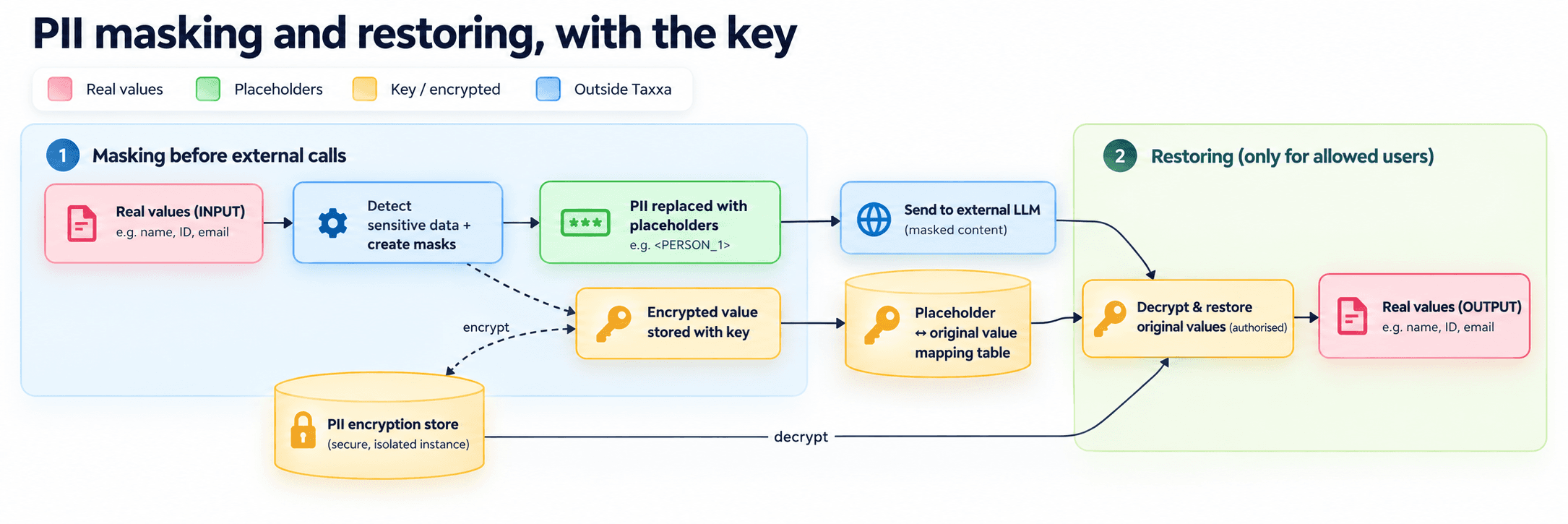
Here's the whole flow in four steps.
Step 1: Find every sensitive value
When a file is uploaded, Taxxa scans it for personal data before anything else happens. We use two layers, because one is never enough.
- Amazon Bedrock Guardrails recognises names, addresses and other personal information in free text. It runs in AWS's EU region in Stockholm.
- Checksum validation catches structured identifiers such as IBANs. These numbers carry built-in check digits, so we can confirm a match mathematically instead of guessing.
The first layer is good at context. The second is good at precision. Together they catch what either would miss alone.
Step 2: Replace them with placeholders everywhere
Each detected value becomes a consistent placeholder: the first person is <PERSON_1>, the first account is <ACCOUNT_1>, and so on. The same person keeps the same placeholder across the whole document, so the model can still follow who paid whom.
Only the masked version travels further. That covers more than the AI call itself:
- AI models receive placeholders only.
- The search index that powers document lookup holds placeholders only.
- Stored chat messages hold placeholders only.
This matters because most data leaks don't happen at the model. They happen in logs, caches and indexes that nobody thought about. We closed those doors too.
Step 3: Lock the real values away
The original values don't disappear. You still need them. But they are encrypted one by one with AES-256-GCM, the same standard banks and governments use for sensitive data.
The encrypted values live in a separate map that links each placeholder to its locked value. The encryption key is kept apart from both the data and the map, with its own secured backup.
The result: even someone who got hold of the stored map would see only ciphertext. Without the key, <PERSON_1> stays <PERSON_1>.
Step 4: Restore the real names, only for allowed readers
When the AI answers, its response still contains placeholders. Before you see it, Taxxa decrypts the map and swaps each placeholder back to the real value.
This happens only for users who are allowed to see that data. Your team reads “Matti Virtanen, IBAN FI21 …” as normal. Everything outside that circle, including the AI itself, only ever saw <PERSON_1>.
For you, nothing changes. You upload files and ask questions exactly as before. The protection runs in the background.
Masking is one layer. Here are the others.
PII masking protects what reaches the model. But a security posture is never one feature. Here's how the rest of Taxxa is built to keep your clients' data safe.
Your data never trains AI models
Taxxa does not use your firm's confidential information to train generative AI models. We also don't permit any of our subcontractors, including the AI model providers we work with, to do so.
This is a written commitment in our Terms and Conditions (clause 8.3.3), not a marketing promise.
Your ledgers, payroll files and client questions stay yours. They don't become part of the next model anyone else uses.
Hosted in the EU
Your data is stored in the EU/EEA. Every AI model provider Taxxa uses processes data in EU/EEA regions:
Provider | Role | Data residency |
|---|---|---|
Microsoft | Infrastructure & AI | EU/EEA |
Anthropic | AI models | EU/EEA |
AI models | EU/EEA | |
AWS Bedrock | AI models, PII detection | EU (Stockholm) |
Mistral AI | AI / OCR | EU/EEA |
A small number of supporting services, such as authentication and customer support, run in the US. Every one of them holds an active certification under the EU–U.S. Data Privacy Framework, which the EU recognises as providing adequate protection. Our full, current sub-processor list is public in our Data Processing Agreement.
Built for GDPR from the contract up
When your firm uploads client data, you stay the data controller and Taxxa acts as your processor. Our Data Processing Agreement is part of every customer contract and spells out what that means in practice:
- We process data only on your instructions, and only to deliver the service.
- Breach notification within 48 hours of us becoming aware of a personal data breach.
- Audit rights. Your firm can audit our processing once a year, including on-site.
- Transparent sub-processors. You get 30 days to object to any new sub-processor we add.
- Your data leaves with you. When the agreement ends, we delete or return your data, your choice.
Behind the contract sit the technical controls: AES-256 encryption at rest, TLS 1.3 in transit, multi-factor authentication and least-privilege access for our team, daily encrypted backups, and SAML 2.0 single sign-on on request.
Your admins decide what's switched on
Every firm has its own risk appetite. So Taxxa gives workspace admins direct control over data privacy settings, applied to every member of the workspace:
Setting | What it does | Default |
|---|---|---|
Help improve Taxxa | Lets Taxxa use anonymised data from your workspace to improve the service | Off |
Voice input | Lets members dictate messages; audio goes to ElevenLabs (US) for transcription | Admin choice |
Web search | Lets members search the web in conversations; queries go to Exa.ai (US) | Admin choice |
We label each setting with exactly where data goes, so your admin can make an informed choice. A firm that wants its client files, prompts and AI answers processed only in the EU can switch off voice input and web search in seconds.
What this means for your firm
- An easier GDPR conversation. Data minimisation is a core GDPR principle. Sending placeholders instead of personal data to AI models is minimisation in its most literal form.
- A clear answer for your clients. When a client asks whether their payroll data is being fed into an AI, you can say no, and explain why.
- Less risk if something goes wrong. Models, indexes and message history hold no readable personal data, so there is far less to expose.
- No change to how you work. Same uploads, same questions, same answers with real names where you're allowed to see them.
Trust is the product in accounting. We think AI tools for this profession should be built on that assumption from day one, not patched later.
See it for yourself
PII masking is live for all Taxxa customers today, with no setup required.
And we're not stopping here. Taxxa is making good progress towards ISO 27001 certification, the international standard for information security management. It will give your IT and compliance teams independent proof of what this post describes: that security at Taxxa is a managed, audited system, not a one-off feature.
Want to see exactly what the model receives when you upload a real ledger or payroll file? Book a demo and we'll walk you through it line by line.